
College Financial Risk Reports
One-page financial viability summaries for mostly private colleges your clients may be considering. Built from public data, updated as new information appears, and written for counselors who advise families.
Small private colleges are under real financial pressure, and a family choosing one deserves to know what the public record shows. These reports pull that record together in one page per institution: IRS filings, audited financial statements, federal financial responsibility scores, IPEDS data, bond disclosures, accreditor actions, court rulings, news coverage, and many other sources, screened through a consistent rubric and summarized in plain language. They are a starting point for your own due diligence, not a prediction that any school will close, and not financial advice.
Subscriptions are $72 per person per year, or $60 per person for firms of four or more. Your subscription also supports the goal of a pro bono only practice: career counseling and college consulting for families who could not otherwise afford it.
College Financial Risk Screen
Updated November 2, 2026
Current methodology v10.0
How to read this. Each college is counted once, at the level from its most recent screen. Levels follow the five-step ladder used on every Risk Summary; the colors match the Risk Level cell on reports issued under methodology v9.0 and later.
These counts are a starting point for your own due diligence, not a prediction that any institution will close, and not financial advice. Counts cover private nonprofit colleges and the public universities screened to date.
What a report contains
Each report is one page, and every report follows the same layout. A header line gives the identifiers (IPEDS, OPE, EIN), the institution type, and the date the screen was run. A box headed What this means for a student summarizes the situation in plain language and says what a family should ask before depositing. A table then works through the signals: institution profile, Heightened Cash Monitoring status, the Kelchen ten-year trend, the federal FRCS score, the Risk Level from our rubric with a confidence rating, and what changed since the prior screen. Key Concerns and Mitigating Factors follow, each point tied to its public source and date, and a closing Verify First section lists the open questions the screen could not settle. Every page carries a watermark with the subscriber's email address.
For how the screen relates to other common measures of college financial health and what it adds to them, see the Methodology Notes.
Three sample reports (fictional colleges)
The colleges below do not exist; the data is illustrative. The three samples show the same one-page format at three different risk levels, so you can see exactly what you would be reading before you subscribe.
XYZ College [Sample]: No Flag
A college that came back: three deficit years and a downgrade, then three balanced years, a closed campaign, and a stabilized bond outlook. Shows how the rubric moves down as well as up, and why a rebound still has to be verified. View the sample report.
RST University [Sample]: Potential Concern
Stable but showing early strain: two operating deficits, a rising discount rate, and a CFO and provost departing within five months, against a strong endowment and clean audits. The watch-list case. View the sample report.
ABC University [Sample]: High Concern
Failed the federal financial responsibility test, bonds cut to speculative grade, four widening deficits, endowment draws above policy, and a 14 percent staff cut, with no going-concern doubt yet. The case where a family should ask hard questions before depositing. View the sample report.
Pricing
One subscription covers one named person. At checkout, choose the number of people and the per-person price adjusts automatically.
1 to 3 people: $72 per person per year
4 or more people: $60 per person per year
Subscriptions renew automatically each year. You will receive a reminder about 30 days before renewal, and you can cancel any time from the link in your receipt or welcome email; access continues through the end of the paid year. Firms can replace a person who leaves by emailing us.
What happens when you subscribe
1. Subscribe opens Stripe's secure checkout page. Choose the number of people; the per-person price and the total adjust automatically.
2. Enter the email address that should have access, since library access is tied to it, plus your full name and billing address (business name is optional). Firms: list the email address of everyone covered in the "Firms only" box.
3. Pay by card, Apple Pay, Google Pay or Link, tick the box agreeing to the Terms of Use, and complete payment. A confirmation message appears on screen.
4. You will then receive two separate emails at the checkout address.
Right away: a payment receipt from Stripe for Aim High Educational Consulting, with a link to manage your subscription (update your card or cancel). Your card statement will show AIM HIGH EC.
Within two business days: a welcome email from Dan with the library link and a copy of the Terms of Use. The receipt does not open the library; the welcome email does, because each address is added by hand. If you subscribed for a firm, each covered person receives their own welcome email.
The library lives at reports.aimhighec.com/subscribers and runs on Papermark, a secure document viewer. Access works only for the email address on your subscription, and the first time you enter you sign the Terms of Use on screen. No welcome email after two business days? Check your spam folder, then write to danreust@aimhighec.com.
Using the report library: a short-ish tutorial
1. Open the library address from your welcome email: reports.aimhighec.com/subscribers. You can bookmark it; it does not change.
2. The first screen asks for your name and email address. Enter your full name and the email address you used at checkout; it must match exactly, because access is tied to that address. The Continue button stays greyed out until the next step is done.
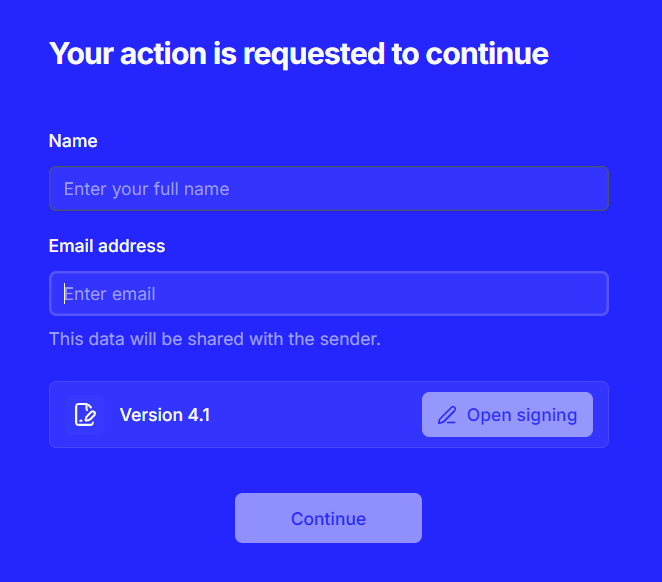
Initial Papermark sign on
3. Click Open signing next to the Terms of Use. The terms open in a signing window. Read them, scroll to the bottom, and complete the three boxes: Name, Date, and Signature (type your name or draw it), then click Sign document. A short confirmation appears at the bottom of the window and you are returned to the first screen.
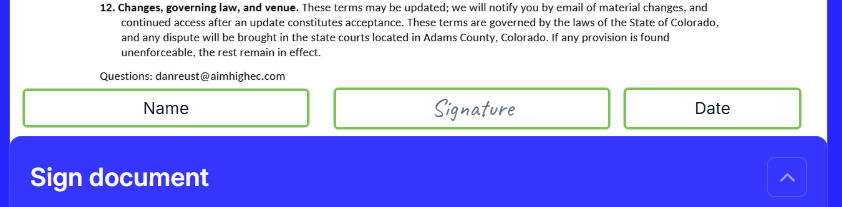
The signing window, with the Name, Date, and Signature boxes at the foot of the document.
4. Back on the first screen, the Terms row now shows a checkmark and a Download button. Download a copy for your records if you like (the same PDF was attached to your welcome email and is linked at the bottom of this page). Click Continue.
5. Papermark then emails a six-digit verification code to the address you entered. Type it into the six boxes and click Continue. If it has not arrived within a minute, check your spam folder; the Resend Code link becomes active after a short countdown.
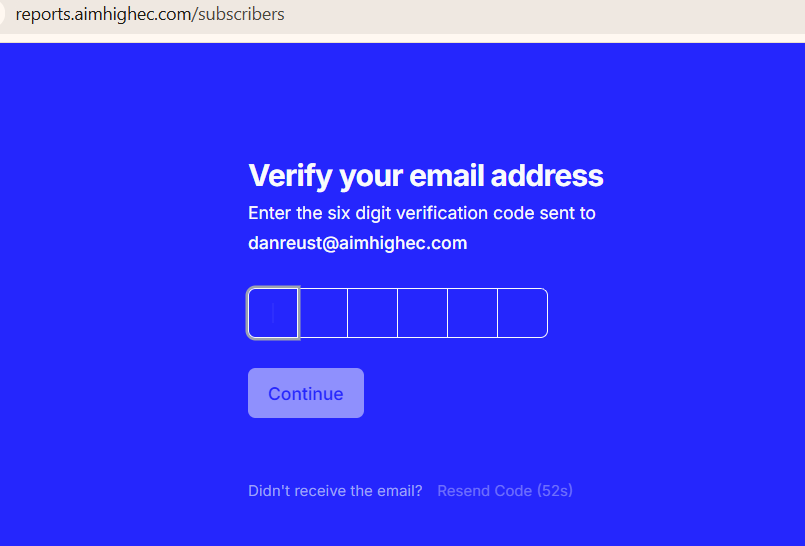
The verification code screen.
6. You are now in the library. The header shows the date the library was last updated. Reports are grouped in alphabetical folders (A-C, D-F, G-L, M-R, S-T, U-Z); open a folder from the list in the middle or from the tree on the left, where every report is listed by college name. The quickest route is the Search box at the top right: start typing a college name and the matching report appears. The FAQ sits at the top of the list for reference.
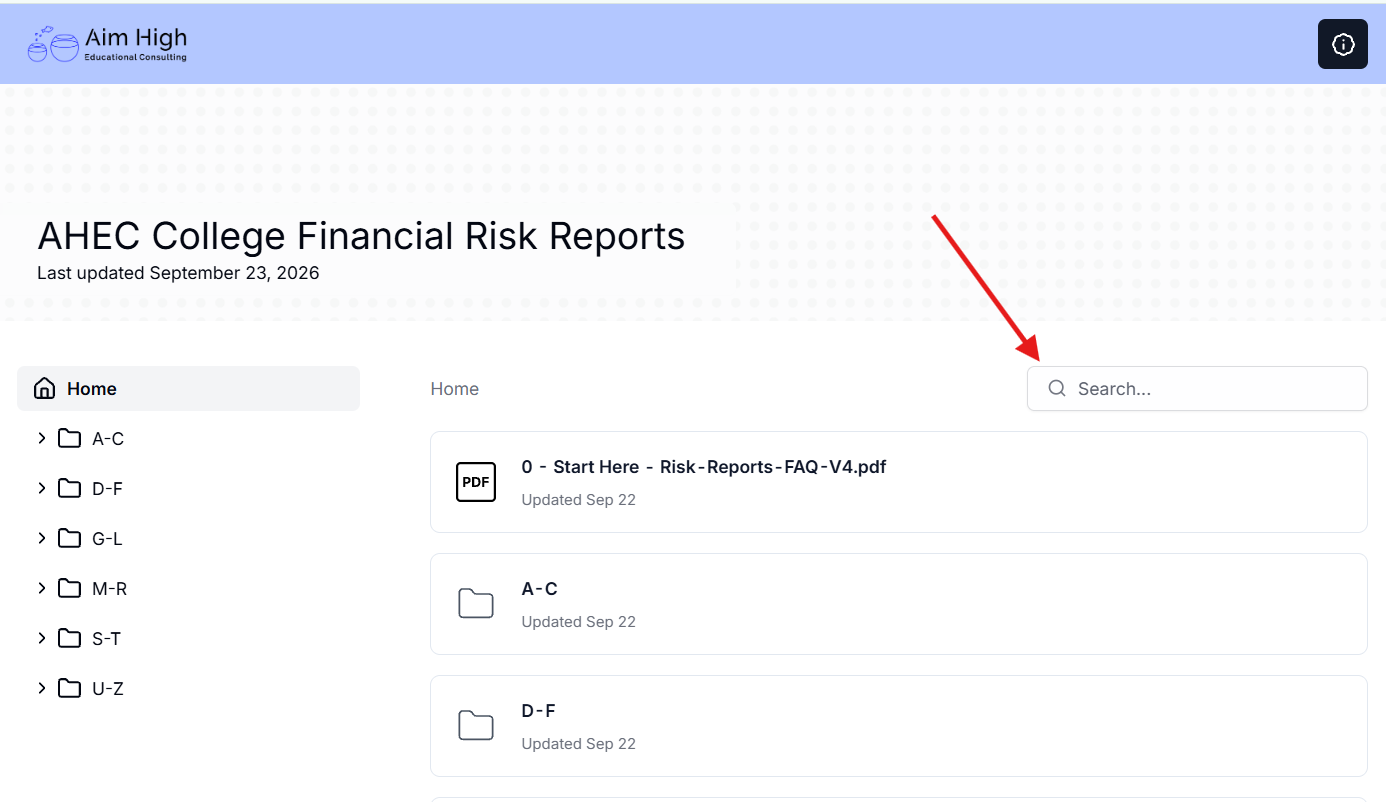
Image of Papermark report library home page
7. Click a college to open its report. Every report is a single page, usually legal size, so there is no page-to-page navigation. It opens at a size that fits your window, with the page in the center and the toolbar at the top right. The Home link at the top left takes you back to the library list at any time.
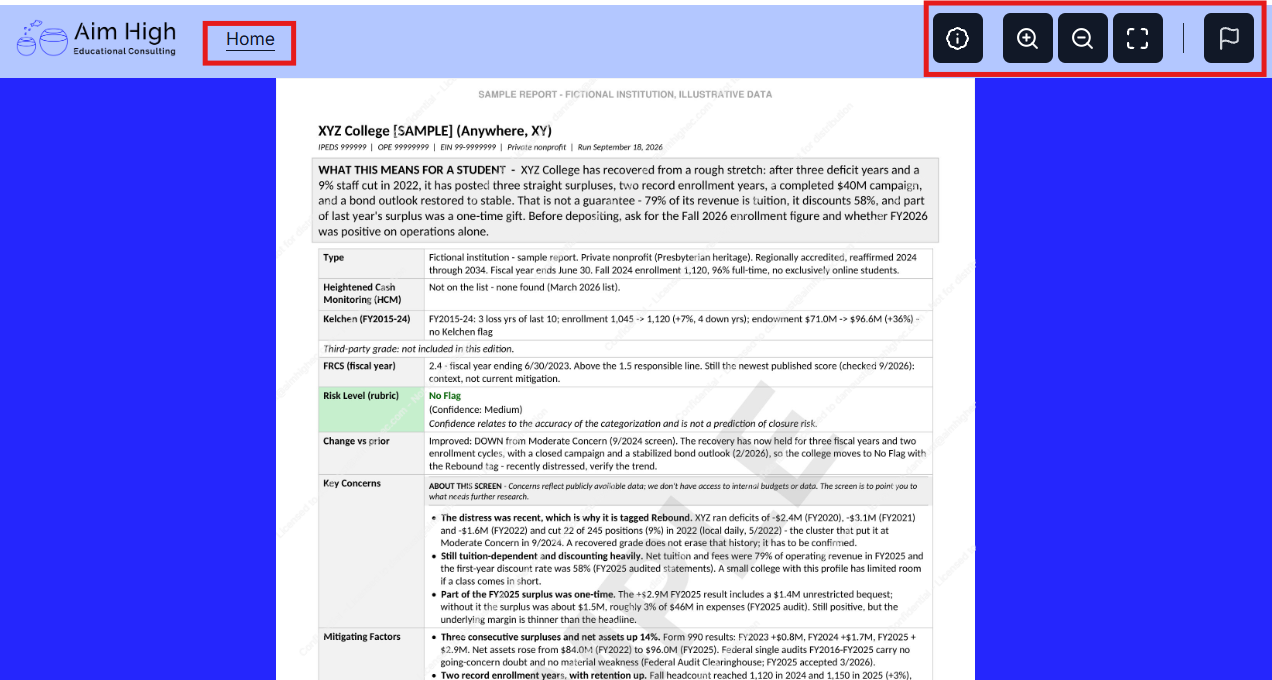
A report open in the viewer at normal size. Toolbar at top right; Home at top left.
8. The toolbar has five buttons: information about the document, zoom in, zoom out, full screen, and a flag for reporting a problem with the viewer. Click zoom in once or twice to read the detail table comfortably; full screen hides the browser frame, which helps on a laptop.
9. Once zoomed, the page is taller and wider than the window. Scroll up and down with the mouse wheel as usual; to scroll left and right, hold Shift while turning the mouse wheel. On a trackpad, a two-finger swipe moves in either direction. Zoom out or press Escape from full screen to get the whole page back.
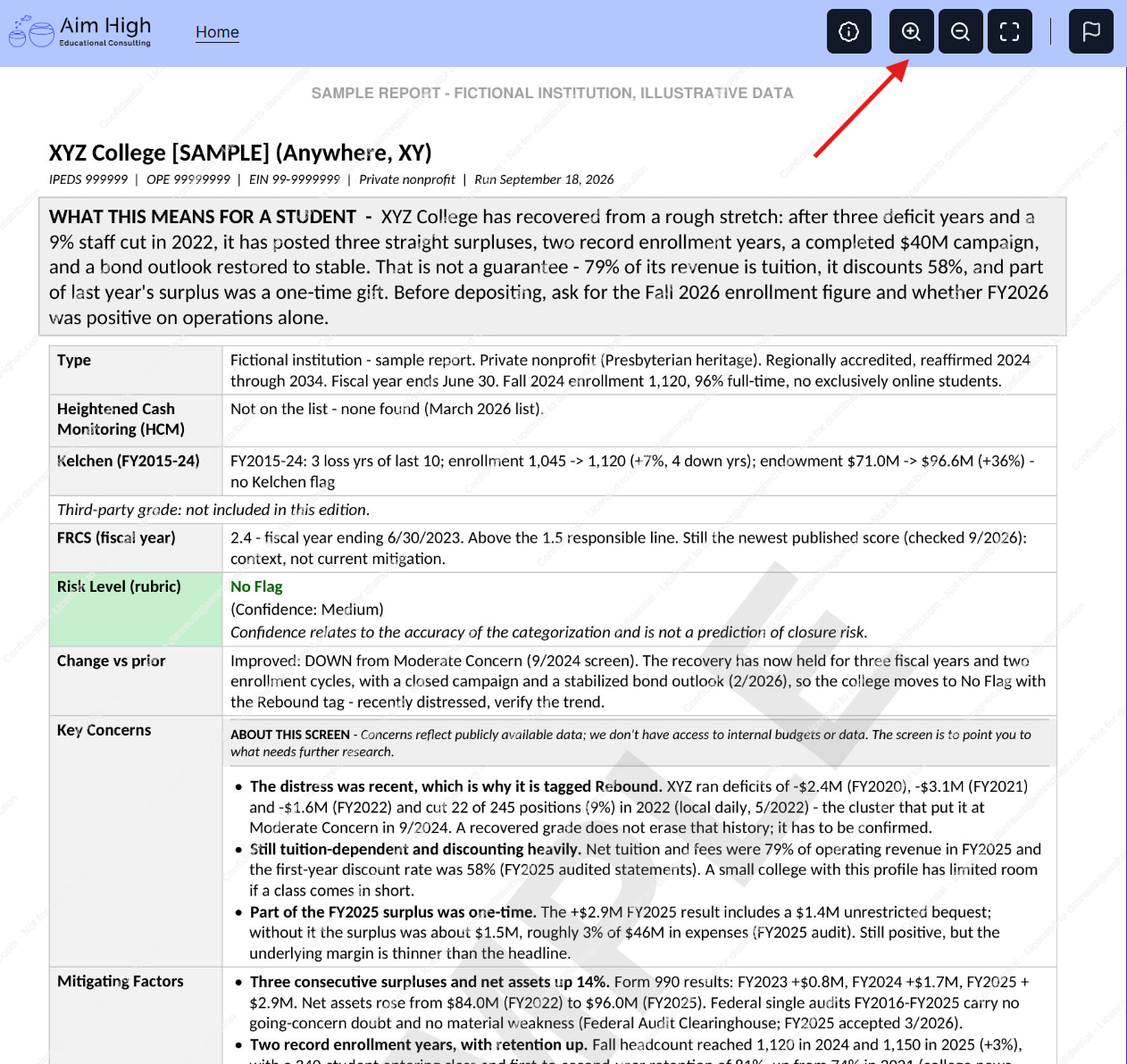
The same report zoomed in. Shift plus mouse wheel scrolls sideways.
10. Every page carries a light repeating watermark with your email address. That is normal; the watermark is how the reports stay licensed to you. Reports are read in the viewer and are not downloadable; the library is always open to you, so there is nothing to file away.
11. To return later, use the same link and the same email address. On the same device and browser you will normally go straight back to the library, even after closing the browser. On a different browser or device, or in a private window, Papermark will ask you to sign the Terms again and enter a new six-digit code; that is normal. New and updated reports appear in the same library; no new link is needed.
If something goes wrong
Papermark says your email is not authorized: you are probably using a different address than the one on your subscription. Reply to the welcome email and we will sort it out.
Continue stays greyed out: the Terms have not been signed yet. Click Open signing, complete the three boxes at the bottom of the document, and click Sign document.
No verification code: check spam, then use Resend Code once the countdown ends. Codes expire after a few minutes, so enter it promptly.
A report looks out of date or does not match what you are hearing on the ground: tell us. Reports are re-run when new information appears, and a note from a counselor is often the trigger.
Frequently asked questions
Click a question to open the answer.
-
Subscribing independent educational consultants, other educational consultants, and financial advisors who help families plan for college, for use in advising their clients on college choices. The reports are intentionally not designed for the general public, and they are meant to inform college decisions, not decisions to buy, sell, or hold any institution's bonds or other securities. We are very sensitive to the struggles that smaller private colleges and universities are encountering. That said, from a consulting perspective, providing the best possible guidance to our clients is primary, so that the client can make informed decisions. Findings reflect publicly available data only.
-
One page per college, always in the same layout: an identifier line, a box headed What this means for a student, a table of the signals checked (Heightened Cash Monitoring, the Kelchen ten-year trend, the Forbes grade, the federal FRCS score, the Risk Level with a confidence rating, and what changed since the prior screen), Key Concerns and Mitigating Factors tied to public sources and dates, and a Verify First section listing the open questions. Reports are prepared with AI-assisted research and reviewed by Dan before release. See the three sample reports above.
-
A rubric calculates each Risk Level. There are more than a dozen potential risk signals or flags, drawn from publicly available data: IRS filings, audited financial statements, federal FRCS scores, IPEDS data, bond disclosures, accreditor actions, court rulings, news coverage, and similar sources. The more signals found and verified for a college, the higher the financial risk level. Sources change over time: some become outdated or are withdrawn from public view, and new ones become available, so the mix behind any given report can differ from one screen to the next.
The confidence rating beside each level describes how sure we are of the category, not how likely the college is to close. High means no open question could change the level; Medium means one of the Verify First items could; Low means a key source could not be found.
A fuller account, including what the screen sees that the public measures do not, is in the Methodology Notes..
-
See the table below.
| Severe | A high-risk signal with near-term event risk: going-concern doubt in the audited financial statements, federal Heightened Cash Monitoring at the stricter level for a financial reason, a speculative-grade bond rating together with a covenant breach or missed payment, or an announced closure or teach-out. |
| High Concern | One or more high-risk signals found and not offset, such as failing the federal financial responsibility standard, a speculative-grade bond rating, accreditor probation citing finances, a forced workforce reduction, or a closure or merger under consideration. |
| Moderate Concern | Either a single high-risk signal offset by dated evidence of turnaround, or a real cluster of signals across more than one area of the public record that is partly mitigated or not yet fully corroborated. |
| Potential Concern | A watch list. Two verified signals from different areas of the record, or one strong item that has not reached a High Concern gate. Enough to warrant watching, not enough to act on by itself. |
| No Flag | No material risk signal was found, or any found could not be verified. No Flag means we looked and found nothing material, not that no risk exists. |
Direction markers. The level says where a college stands; a marker on the same line says which way it has moved. ▲ Improving appears when a college has come up at least one level since a screen six months or more earlier, or when it has met a defined recovery test after a period of distress (for example, two consecutive clean audits after a going-concern flag, or two fiscal years back in balance after two years of deficits). ▼ Declining appears when it has dropped a level over the same window. A marker never changes the level, and an improving college still gets a Verify First question asking whether the recovery is real, because several apparent rebounds have masked recent distress.
Public institutions are rated on the same ladder and carry a PUBLIC tag on the report. Because they file no Form 990 and receive no federal composite score, the screen reads their audited statements, state appropriations and system decisions instead, and adds signals that matter mainly to publics: a proposed campus closure, merger or consolidation, or a declared retrenchment. The report says so on its face.
Every rating carries a confidence level (High, Medium or Low) that describes how complete the public evidence was, and every report states what changed since the prior screen and on what basis. The colors match the Risk Level cell on the reports.
-
No. The library covers only the institutions we have screened; it is not an exhaustive list, and a college can be absent for different reasons. Very small colleges (generally under 500 students) and specialty institutions (for example, The American College of Financial Services) are usually outside the screen because the data is too thin or the rubric does not fit. Well-resourced colleges are usually absent for the opposite reason: the library concentrates where the public record shows something to examine, so a college with nothing to examine rarely gets a full screen, and a No Flag report exists only where a college was actually screened. Public institutions appear selectively and are not scored on the standard rubric (see the table above). The absence of a college is therefore not a statement about its financial health in either direction. If you need a college that is not there, see the question on suggesting a college below.
-
Schools carrying a rating are re-screened at least quarterly. Schools with no flag are checked against new filings, federal lists and news every month, re-screened when something turns up, and refreshed at least once a year. The history of every rating is kept.
-
$72 per person per year. Firms of four or more pay $60 per person for everyone covered; choose the number of people at checkout and the price adjusts. Any price change applies only at renewal; the reminder we send about 30 days beforehand will state the new price.
Firm pricing is for people at one organization, so everyone covered must use an email address at the firm's own domain; addresses at general providers such as Gmail do not qualify for the firm rate unless we agree otherwise beforehand (email us if your firm runs on a shared provider). Each person gets their own access at their own address. A firm can replace a person who leaves by emailing us; the replacement takes over the remaining term. To add a person mid-year, email us and we will add the seat to the existing subscription, prorated, with the tier recalculated for the whole group.
-
Within two business days you will receive a welcome email from Dan at the address you used at checkout, with the library link and a copy of the Terms of Use. Access works only for that email address, and the first time you enter you sign the Terms of Use on screen. See the tutorial above.
-
No. Your license is personal and non-transferable: you may use a report in advising your clients, but you may not forward, post, copy, screenshot, or otherwise distribute a report or any portion of one, including to colleagues, clients, or families. Each report is dynamically watermarked with your email address, and views are logged. If we become aware of reports being distributed in any form, the subscription will be cancelled with no refund. The full Terms of Use are presented at checkout and again when you first access the library. They are also linked at the bottom of this page.
-
Each subscription covers one named person. Colleagues at the same firm each need their own, which is what the firm pricing is for. Sharing a login or forwarding reports is a breach of the license.
-
Because the reports are delivered digitally and can be read in full immediately, a charge is non-refundable once any report has been viewed after it, by you or by anyone covered by the same subscription. If no report has been viewed since the charge, you may request a full refund within 7 days of it by emailing danreust@aimhighec.com. This applies to renewals as well: if you meant to cancel and nobody has opened a report since the renewal charge, ask within 7 days.
-
Subscriptions renew automatically each year to the payment method used at checkout. The purchaser gets a reminder about 30 days before renewal (for a firm, that is the person who paid, not each covered person), and if the price has changed the reminder will say so. You can cancel any time from the link in your receipt or welcome email; you keep access through the end of the paid year and are not charged again.
-
Yes, and counselor questions are one of the main reasons a college gets screened or re-screened. Each subscription may suggest up to three colleges per subscription year, plus one more for each covered person beyond the first (so a solo subscriber has three, a five-person firm has seven). Email danreust@aimhighec.com with the college and what prompted the question. We look at the public record first and run a full screen when there is something to examine; a college with nothing in triage usually stays out of the library, and that is not a judgment either way. Completed reports go into the library for all subscribers. If you need more than your allotment, ask; additional screens may be available for a per-report fee. If a report does not square with what you are hearing on the ground, tell us; that does not count against your allotment.
-
Aim High Educational Consulting aims to be a pro bono only practice: career counseling and college consulting for families who could not otherwise afford it. Subscription income covers the costs of running the practice and the research behind the reports, which is what makes that goal reachable. Nobody is getting rich; the goal is to keep the doors open and the data current.
Aim High Educational Consulting LLC. College Financial Risk Reports are a starting point for your own due diligence, built on public data. They are not a prediction that any institution will close, and not financial, legal, or investment advice. Verify all findings independently before acting.
Terms of Use | Questions: danreust@aimhighec.com